Have you ever felt annoyed by Adobe flash content playing from different corners of a web page. Annoying music playing from web pages. Videos automatically streaming without your consent.
Ever felt like shutting these flash content for good.
Well...then FlashBlock is the addon for you.
Flashblock is Firefox/Chrome addon which automatically block Flash content on Web pages and allows you to selectively enable flash content.
Download Flashblock for Google Chrome
Download Flashblock for Mozilla Firefox
Short Description:
=============
The extension automatically blocks flash content on webpages.
Each flash element is being replaced with a placeholder that allows you to load only selected elements on a given page.
You can also manage a whitelist of allowed websites via a configuration panel.
In general, FlashBlock helps with lowering memory usage, reducing cpu cycles,
and can be used as an alternative to AdBlock.

Cleanup Assistant is a set of over 20 tools designed to help you increase your computer's performance, clean your disks and protect your privacy. Cleanup Assistant runs on Windows XP, Windows Vista and Windows 7, on both 32-bit and 64-bit versions. Some of the features:
Cleanup Assistant helps you keep your hard drive in good shape, while protecting your privacy and optimizing space usage. Besides, this new version includes five tools instead of the three original ones.
Cleanup Assistant looks too simple, both in design and functions. It is effective & does its job very well.
Cleanup Assistant's Features:
- Cleans your computer by removing trash items, finding duplicate files, finding empty folders, renaming files, searching & replacing text in files, reporting and removing large applications.
- Keeps you up to date with live browsable disk and file usage charts.
- Manages large music libraries.
- Protects your privacy : permanently removes files and folders, shreds usb drives and free disk space.
- Gives extensive information about your computer's hardware and software.
- Helps you manage your computer's performance by presenting you with detailed information about startup items, services and scheduled task.
More over it helps you to use your computer Easily!
You can download it from its official website or from Softonic .

Ever wondered what might be your computer's gender??
well, we'll tell you how to find it..
- Open Notepad
- Copy & paste the below code:
- CreateObject("SAPI.SpVoice").Speak"I love YOU"
- Save it as love.vbs (file > save as > love.vbs)
- Run it. (double click)
You'll know :-)

What is Jotform?
JotForm is the first web based form builder. Its intuitive drag and drop user interface makes form building a breeze. Using JotForm, you can create forms, integrate them to your site and receive responses by email.
JotForm is developed mainly for webmasters, but anybody with an Internet connection can use it. JotForm is WYSIWYG, so you can still make web forms without any web design or HTML experience. Since JotForm is hosted on our servers, there are no requirements.
What kind of forms can I create with JotForm?
JotForm supports all standard web form field types. In addition, it allows you to use new and intuitive fields in your form such as Date Time Picker, Star Ratings, or CAPTCHA checks. Using JotForm, you can create any kind of web form.
Here is a short list of examples:
 Contact Form Contact Form | Blog Contact/Survey | Event Calendar |
| Document Uploader | Satisfaction Survey | Time Sheet |
| Job Application Form | RSVP for a Party or Wedding | Bug Tracker |
| Reservation Form |
JotForm is a great online form building tool that can match up with the likes of Google Forms, Flexadex and Notefish etc. JotForm does not require any installation and can be directly accessed from its website (click here)
Click the above link & Start making forms!
JotForm offers users an easy to use interface with a ribbon styled menu and a left hand pane which contain different tools.
Radio Buttons,Submit Buttons & even file upload buttons can be added along with textboxes and headings.
You may read the faq page for more information.
Making a FakeVirus is really Simple, you can be a star infront of your friends with this small trick! :P
Open up Notepad and paste the following Code & then Save it!X5O!P%@AP[4\PZX54(P^)7CC)7}$EICAR-STANDARD-ANTIVIRUS-TEST-FILE!$H+H*
It should look like the below picture!
If you've got an Anti virus installed in your pc,it'll definitely pick up the Fake Virus, if its not showing you should make sure that the Anti virus you've installed is working properly! :)

Have u ever been annoyed by Windows Update which blocks ur PC from being shutdown when you were just about to leave ur PC and switch it Off...
Well I have been many many times...
Is there a solution...?
Yep...there is...
Block it from blocking ur shutdown button...Hahaha...
MANUAL REG HACK
Go to Run -> type regedit -> press Enter
Go to following key->
HKEY_CURRENT_USER\Software\Policies\Microsoft\Windows\WindowsUpdate\AU
Add a 32-bit DWORD value called NoAUAsDefaultShutdownOption with a value of 1.
No reboot should be necessary.
Now our Sleep button should be back to the way it was, but if you wanted to use the Install Updates and Shut Down option, it’s still available via the shutdown menu:
AUTOMATED REG FILE
Open Notepad-> Paste the following contents -> Save as Block.reg
Windows Registry Editor Version 5.00 [HKEY_CURRENT_USER\Software\Policies\Microsoft\Windows\WindowsUpdate\AU] "NoAUAsDefaultShutdownOption"=dword:00000001
OPen file and press Yes
Voila!!!!
Have Fun...!

How to change your IP Address, Can be used for a few reasons IP Banned or being DDoS'ed ect...
First you will want to know what your existing IP is, simply go to www.whatismyip.com and make note of your existing IP.
Method 1: You can try to reset your cable modem or dsl modem. Sometimes this will give you a new IP
Method 2: You can try to reset both your modem and router
Method 3: If you are using Dial Up, simply disconnect and reconnect to the internet 9 out of 10 times you will get a new IP
Method 4: If you are using a router, login to your router and change the MAC ADDRESS for you WAN port to something else, just change 1 character to something different. Then reset your modem, than your once that resets, reset your router
Method 5: If you are not using a router, some ethernet cards with differnet versions of operating systems allow you to change your hardware ID (mac address). You can also try: http://www.klcconsulting.net/Change_MAC_w2k.htm. After you change your Mac Address you will need to reset your modem. If you have digital phone don't forget to take the battery out of the modem when you reset it to get a full reset.
Method 6: Start> Run> Type CMD Press Enter Black Screen will pop up (Command Prompt) type in ipconfig /release put a space between ipconfig and /release Unplug Your Modem Power Cable from your DSL or Cable Modem wait 2 mins then Plug the Power cable back in and type ipconfig /renew make sure you have a space between the ipconfig and the /renew press enter and hopefully it wil change your IP if your on a router you will need to use Method 4.
Method 7: on Windows XP go to start Control Panel, Network and Internet Connections, from Network and Internet Connections look for Network Connections look for your Local Area Connection some people may have a few if you add a network connection anyways right click on which ever Local Area Connection is connected go to Status, click on the Support TAB click on the Details button look for the Physical Address type it out in notepad go back to Local Area Connection right click go to Properties click the Configure button click the Advanced tab look in there for Network Address put a dot in the () for the value box place your Physical Address without the dashes into that box change the last number or letter click OK and this will disconnect from the internet and get you a new IP this will only work if your hooked up with just a DSL or Cable modem you will need to not be using a router or switch.
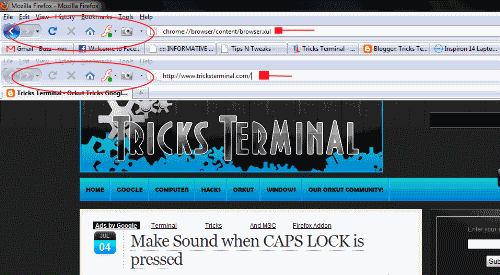
Have U tried opening Firefox...Inside firefox.....???
Well..try it out now...
just paste this code in address bar and hit Enter
chrome://browser/content/browser.xul

Its a common problem for most people to accidently hit the CAPS lock key when typing fast....
Simply Turn On Toggle Keys to hear a Sound whenever U press the CAPS lock
For XP Users
Go to Control Panel -> Accessibility Options -> Select Toggle Keys and Turn it On
For Vista & 7 Users
Go to Control Panel -> Ease Of Access Centre -> Keyboard Settings -> Turn on Toggle Keys
I hope it proves helpful

Here are some useful RUN Commands in Windows
Accessibility Controls - access.cpl
Add Hardware Wizard - hdwwiz.cpl
Add/Remove Programs - appwiz.cpl
Administrative Tools - control admintools
Automatic Updates - wuaucpl.cpl
Bluetooth Transfer Wizard - fsquirt
Calculator - calc
Certificate Manager - certmgr.msc
Character Map - charmap
Check Disk Utility - chkdsk
Clipboard Viewer - clipbrd
Command Prompt - cmd
Component Services - dcomcnfg
Computer Management - compmgmt.msc
Date and Time Properties - timedate.cpl
DDE Shares - ddeshare
Device Manager - devmgmt.msc
Direct X Control Panel (If Installed)* - directx.cpl
Direct X Troubleshooter - dxdiag
Disk Cleanup Utility - cleanmgr
Disk Defragment - dfrg.msc
Disk Management - diskmgmt.msc
Disk Partition Manager - diskpart
Display Properties - control desktop
Display Properties - desk.cpl
Display Properties (w/Appearance Tab Preselected) - control color
Dr. Watson System Troubleshooting Utility - drwtsn32
Driver Verifier Utility - verifier
Event Viewer - eventvwr.msc
File Signature Verification Tool - sigverif
Findfast - findfast.cpl
Folders Properties - control folders
Fonts - control fonts
Fonts Folder - fonts
Free Cell Card Game - freecell
Game Controllers - joy.cpl
Group Policy Editor (XP Prof) - gpedit.msc
Hearts Card Game - mshearts
Iexpress Wizard - iexpress
Indexing Service - ciadv.msc
Internet Properties - inetcpl.cpl
IP Configuration (Display Connection Configuration) - ipconfig /all
IP Configuration (Display DNS Cache Contents) - ipconfig /displaydns
IP Configuration (Delete DNS Cache Contents) - ipconfig /flushdns
IP Configuration (Release All Connections) - ipconfig /release
IP Configuration (Renew All Connections) - ipconfig /renew
IP Configuration (Refreshes DHCP & Re - Registers DNS) - ipconfig /registerdns
IP Configuration (Display DHCP Class ID) - ipconfig /showclassid
IP Configuration (Modifies DHCP Class ID) - ipconfig /setclassid
Java Control Panel (If Installed) - jpicpl32.cpl
Java Control Panel (If Installed) - javaws
Keyboard Properties - control keyboard
Local Security Settings - secpol.msc
Local Users and Groups - lusrmgr.msc
Logs You Out Of Windows - logoff
Microsoft Chat - winchat
Minesweeper Game - winmine
Mouse Properties - control mouse
Mouse Properties - main.cpl
Network Connections - control netconnections
Network Connections - ncpa.cpl
Network Setup Wizard - netsetup.cpl
Notepad - notepad
Nview Desktop Manager (If Installed) - nvtuicpl.cpl
Object Packager - packager
ODBC Data Source Administrator - odbccp32.cpl
On Screen Keyboard - osk
Opens AC3 Filter (If Installed) - ac3filter.cpl
Password Properties - password.cpl
Performance Monitor - perfmon.msc
Performance Monitor - perfmon
Phone and Modem Options - telephon.cpl
Power Configuration - powercfg.cpl
Printers and Faxes - control printers
Printers Folder - printers
Private Character Editor - eudcedit
Quicktime (If Installed) - QuickTime.cpl
Regional Settings - intl.cpl
Registry Editor - regedit
Registry Editor - regedit32
Remote Desktop - mstsc
Removable Storage - ntmsmgr.msc
Removable Storage Operator Requests - ntmsoprq.msc
Resultant Set of Policy (XP Prof) - rsop.msc
Scanners and Cameras - sticpl.cpl
Scheduled Tasks - control schedtasks
Security Center - wscui.cpl
Services - services.msc
Shared Folders - fsmgmt.msc
Shuts Down Windows - shutdown
Sounds and Audio - mmsys.cpl
Spider Solitare Card Game - spider
SQL Client Configuration - cliconfg
System Configuration Editor - sysedit
System Configuration Utility - msconfig
System File Checker Utility (Scan Immediately) - sfc /scannow
System File Checker Utility (Scan Once At Next Boot) - sfc /scanonce
System File Checker Utility (Scan On Every Boot) - sfc /scanboot
System File Checker Utility (Return to Default Setting) - sfc /revert
System File Checker Utility (Purge File Cache) - sfc /purgecache
System File Checker Utility (Set Cache Size to size x) - sfc /cachesize=x
System Properties - sysdm.cpl
Task Manager - taskmgr
Telnet Client - telnet
User Account Management - nusrmgr.cpl
Utility Manager - utilman
Windows Firewall - firewall.cpl
Windows Magnifier - magnify
Windows Management Infrastructure - wmimgmt.msc
Windows System Security Tool - syskey
Windows Update Launches - wupdmgr
Windows XP Tour Wizard - tourstart
Wordpad - write

If you want to a text to appear while Windows starts, this is the topic which you should read.
Simple Steps:
Go to Start --> Run (windows+R)
Type regedit
Click Enter
Go here: HKEY_LOCAL_MACHINE\SOFTWARE\MICROSOFT\WINDOWS NT\CURRENTVERSION\WINLOGON
Modify the key LEGALNOTICECAPTION With the text of your choice. (TITLE)
Modify the key LEGALNOTICETEXT with the text of your choice. (tEXT)
Restart your Windows for this to work.
Here is a trick to make free calls from your computer to any mobile/landline in anywhere in the world!
Very much free to use!
Link
The only problem is that the call will only last for 30 Seconds.
An Advertisement will be shown for 30 seconds after entering the number and after that the call will be connected.
Even though its for 30 secs, we can make the best use of it.
All thanks to Evaphone
If you know any other website such as Evaphone.. do let us know with your Comments.


To Open up Firefox Browser inside a Firefox Browser!,follow the steps below!
- Open Mozilla Firefox
- Copy & Paste the below Code in the Address bar!
chrome://browser/content/browser.xul
By paste the above code again in the Address bar, you can open more n more Mozilla Firefox Browser inside your Mozilla Firefox Browser!

If you are leaving your computer for a while and do not wish to turn it off, but want to assure that no-one else can use the computer while you are away, locking the desktop is the best option.
By pressing WINDOWSKEY+L, you password protect your system just as if you had logged out or restarted the computer. The advantage is that any programs or processes that were running when you locked the desktop will stay open and running in the background, ready for you to resume work or play.
If you like my post, do comment ;)

To change the name of the Recycle Bin desktop icon,
- Click Start then goto Run, write type Regedit and press Enter. It opens Registry Editor. Now in Registry Editor go to:
- HKEY_CLASSES_ROOT/CLSID/{645FF040-5081-101B-9F08-00AA002F954E}
- Now Open the ShellFolder folder
- Change the Attributes data value from 40 01 00 20 to 50 01 00 20. Once completed change the CallForAttributes dword value to 0x00000000 (double-click and change value data to 0).
- You must change both of these values to get the rename to appear.
Now go to your Desktop & Change your Recycle Bin to anyname you want :-)
If you like this Post, Please Comment ;)

Shutting Down a PC will take Sometime..
But Sometime if we've Opened Lots of stuffs, it can get freezed.
If you Want to Shut down you Pc in About 3 Seconds..
Click Ctrl + Alt + Delete (Task Manager will open)
Go to Shutdown in the menu bar!
Then, Hold On Ctrl And Click Turn Off for about 3 Seconds.
Then your PC will be Shutted Down in a Sec ;)
I Advice you not to use it everytime as it may Cause loss of Some Data (Maybe)
Anyways, Its usefull when we are in a hurry ;)
Note: This Process maynot Work In Windows Vista but will surely work in Windows XP!

Here's a neat trick to CHANGE the Administrator Password in 10 seconds
Requirements:
U must be already logged on to Admin Account
Go to Start -> Run -> Type cmd & Hit Enter
Command Prompt window opens
Type
net user administrator urnewpassword
Press Enter to Change the password...!!
Change administrator to the name of currently logged in Username who is administrator
Change urnewpassword to the password u want like opensesame...
Have Fun...!

Ever felt like scaring the SHIT out of ur Friend...
Well..Here's the TricksTerminal trick for u...
Open and Close the Cd-ROM infinite number of times......U wont forget the expression on ur friends face...! Hahaha..
Copy the Following code in a Notepad File & Save it as 'anyname.vbs'
Set oWMP = CreateObject("WMPlayer.OCX.7" )
Set colCDROMs = oWMP.cdromCollection
if colCDROMs.Count >= 1 then
do
For i = 0 to colCDROMs.Count - 1
colCDROMs.Item(i).Eject
Next ' cdrom
For i = 0 to colCDROMs.Count - 1
colCDROMs.Item(i).Eject
Next ' cdrom
loop
End If
How can u stop the script.?
- Restart ur PC
OR
- End the Script from task Manager..! Process Name -> Wscript.exe
Hehehe...
Plz Comment if u Lyk this post!
Have Fun!!!

Enlarged Image => Click Here!
Follow the Instructions to Change the title bar as mentioned in the Picture above!
- Open Registry by going to Start then Run and Enter regedit.
- Navigate to HKEY_CURRENT_USER\Software\Microsoft\Internet Explorer\Main.
- In right hand panel look for string "Window Title"
- If its not there , Create a String..
- Change its value to whatever custom text you want to see.
OR >> Use the TricksTerminal Quick Code
Simply paste the following code into a notepad file and save it as 'anyname.reg'
Open this file and press Yes to get the same effect...!!!
Windows Registry Editor Version 5.00
[HKEY_CURRENT_USER\Software\Microsoft\Internet Explorer\Main]
"Window Title"="Your text here"
Do Comment if you lyk my Work! ;)

FeedBurner FeedCount