-To bold your text, add an asterisk (*) before and after content. eg: this will turn bold
- To italic your text, add an underscore (_) before and after content. eg: this will turn italic
- To strike your text, add an hyphen (-) before and after content. eg: this will be striked
-Line Break: Use SHIFT + ENTER
-To tag a user, use + or @ followed by the profile name of the user
1. Type message into the share box
2. Modify the list of people you're sharing with to contain just one person (for example, my friend Joe in the example below)
3. Push the Share button.
Note that you or your friend can invite more people into the conversation later by @mentioning(or +mentioning) them. Your friend could use the "Share" button to reshare the message -- you can disable sharing with the (v) dropdown in the upper right corner of the message if you want that option to go away.

 Winzip & Winrar are the most popular software's used for handing archive formats like zip, rar, iso, etc!
Both of the above software's obviously are not free so the next best alternative is 7-zip ,which is an open-source Windows-only tool that doesn’t have a very fancy GUI but can do everything that you would want a file compression software to do.
7-Zip performs all the task just like Winrar & Winzip. The program supports 7z, XZ, BZIP2, GZIP, TAR, ZIP, WIM, ARJ, CAB, CHM, CPIO, CramFS, DEB, DMG, FAT, HFS, ISO, LZH, LZMA, MBR, MSI, NSIS, NTFS, RAR, RPM, SquashFS, UDF, VHD, WIM, XAR, Z & other formats too.
If you are looking for an alternative to 7-zip as well, go with PeaZip. This is also a free and open-source zip utility which is available for Windows, Mac and Linux.
In PeaZip, all the features within Winzip , Winrar as well as 7-Zip is available. It also includes password protection in a single click which is also available in 7-Zip.
Both 7-zip and PeaZip have portable versions , you may try them without installation.

As you all know, Google's online Android Market is huge and has over 200,000+ Apps. They include from free apps as well as paid apps. Paid apps costs you from 1$ to even 300$.
Google's Android market doesn't allow us to try application before purchasing, but Amazon runs a parallel online store like Google's Android Market and it lets you to test and run the application before purchasing for certain applications.
Here is the list of certain applications that can be tried before purchasing, but unfortunately it this feature is only available to Android users located in United States.
Refund Allows you to try Paid apps free of Cost: 
Well, if you want to try a Paid App on Google Android Market and if its too costly & you just want to try it for sometime, there is a way to try the app for 10-12 minutes.
You just have to buy the application, use it for 10-12 minutes and then refund the app. The app will be uninstalled from your mobile phone and your account wont be charged.
How to Refund an Android app?
Step 1: Visit the Google Android Market, from desktop or from your mobile phone, and buy any of the 'paid' apps.
Step 2: The app is now installed on your mobile phone. Launch the app and you can test it for 10-12 minutes.
Step 3. Go back to the Android Market app on your mobile phone and under "My Apps," tap the app name that you are trying to refund. Hit the "Refund" button and the app will be automatically uninstalled from your mobile phone.
Step 4. Once the App has been uninstalled, it may ask you to specify a reason for removing the app. You can check "I'd rather not say" here and the app amount will be refunded.
You will also get an email from google which quotes, "You have uninstalled the application from your phone. We have cancelled your order and you have not been charged."
The refund process is quite simple & easy to use and 10 minutes is more than enough for a person to get an idea about the app. However, there are 2 things regarding Google's refund policy which tells us that;
1. You may have only 15 minutes to return an app to the Android Market from the time of download and after that the "refund" option will disappear.
2. You can only return an app once, refunding wont work the second time on the same app.

Cleanup Assistant is a set of over 20 tools designed to help you increase your computer's performance, clean your disks and protect your privacy. Cleanup Assistant runs on Windows XP, Windows Vista and Windows 7, on both 32-bit and 64-bit versions. Some of the features:
Cleanup Assistant helps you keep your hard drive in good shape, while protecting your privacy and optimizing space usage. Besides, this new version includes five tools instead of the three original ones.
Cleanup Assistant looks too simple, both in design and functions. It is effective & does its job very well.
Cleanup Assistant's Features:
- Cleans your computer by removing trash items, finding duplicate files, finding empty folders, renaming files, searching & replacing text in files, reporting and removing large applications.
- Keeps you up to date with live browsable disk and file usage charts.
- Manages large music libraries.
- Protects your privacy : permanently removes files and folders, shreds usb drives and free disk space.
- Gives extensive information about your computer's hardware and software.
- Helps you manage your computer's performance by presenting you with detailed information about startup items, services and scheduled task.
More over it helps you to use your computer Easily!
You can download it from its official website or from Softonic .

Ever wondered what might be your computer's gender??
well, we'll tell you how to find it..
- Open Notepad
- Copy & paste the below code:
- CreateObject("SAPI.SpVoice").Speak"I love YOU"
- Save it as love.vbs (file > save as > love.vbs)
- Run it. (double click)
You'll know :-)

This feature has been enabled by facebook around 1 month back, but still very few people know this!
That is the reason why i'm posting it here! ;-)
At first when we use Comments,a simple typo error could lead us to the deletion of the whole comment which we've posted. But now with the new Comment Editing update we can do it much easier by just clicking the [X] button.(the right side of the place you've commented)
This new feature in Facebook comments lets you edit any comment that you have made on someone’s status update, photos or even shared links and pages.
Steps to Edit your Comments:
- Take your cursor to the place where you have commented.
- You'll find a [X] sign on the right side.
- Click it & edit it
- Hit Enter when you're done!
Restriction:
# You are not allowed to Edit if someone has commented after you!
Making a FakeVirus is really Simple, you can be a star infront of your friends with this small trick! :P
Open up Notepad and paste the following Code & then Save it!X5O!P%@AP[4\PZX54(P^)7CC)7}$EICAR-STANDARD-ANTIVIRUS-TEST-FILE!$H+H*
It should look like the below picture!
If you've got an Anti virus installed in your pc,it'll definitely pick up the Fake Virus, if its not showing you should make sure that the Anti virus you've installed is working properly! :)

Freetubetv is one of the best website to watch tv online with over 600+ Channels.
Freetubetv provides categories such as:
- News
- Business
- Educational
- Entertainment
- Religious
- Music
- Sports
- Lifestyle
- Movies
- Adult
Family Friendly Version of freetubetv will remove all the Inappropriate Content.
It is nice & fast..
So Enjoy watching tv on your computer! :)
Link: FreeTubeTv

Searched the Internet for working websites to download the Youtube Video's MP3 Part.
Well, here we provide you with the best webites to download the youtube videos in to mp3 format for playing it in Mp3 players etc! :)
3 Simple Steps & you can Hide your Relationship status from everyone! :)
- Click Edit My Profile
- Choose Relationships (left side)
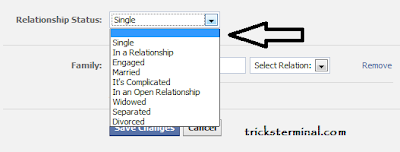
- Choose the Relationship Status to the first option which is blank! (as shown in the picture above)
- Now Click Save Changes.
And you are done.
Now your Relationship Status is Hidden from everyone on facebook!

Vodafone recently introduce a "Balance Transfer System"..You can send & receive balances among ur friends & relatives..:-)
Note:
1) Prepaid customer can send or receive balance only one time a day.
2) Transaction charges as follows:
--- Between Rs. 05 - 09 = Rs. 1 is deducted
--- Between Rs. 10 - 24 = Rs. 2 is deducted
--- Between Rs. 25 - 30 = Rs. 3 is deducted
3) The Simcard must be atleast 3 Months Old.

Selective Tweets- This application lets you selectively post a status update on your Facebook Page from Twitter simply by adding the hashtag “”#fb”.
http://apps.facebook.com/selectiv
Blog RSS Reader- Blog RSS Feed Reader allows you to add a personal blog, corporate blog RSS Feed or any other RSS feed to your Facebook profile for your friends to read. It’s a great way to drive traffic to your blog or website.
http://www.facebook.com/apps/app
Twitter App-This app automatically re-posts your tweets in your Facebook Page status. A big time-saver, but a potential bother to your connections if you use Twitter a lot, or if you tweet about topics that aren’t related to your Page.
http://www.facebook.com/apps/applic
Credits: Amal

We are proving you with some good Websites for learning Adobe Photoshop.
Learn it well! :)
All the below websites are collected from many other websites and the sole credits goes to each one of them.
We collected some more websites and added it up with this.
Hope that these websites help you with learning Adobe Photoshop completely! :)
~ ~ ~ ~ ~ ~ ~ ~ ~ ~ ~ ~ ~ ~ ~ ~ ~ ~ ~ ~ ~ ~ ~ ~ ~ ~ ~ ~ ~ ~ ~ ~ ~ ~ ~ ~ ~ ~ ~ ~ ~ ~ ~ ~ ~ ~ ~ ~ ~ ~ ~ ~ ~ ~ ~ ~ ~ ~ ~ ~ ~ ~ ~ ~ ~ ~ ~ ~ ~ ~ ~ ~ ~ ~ ~ ~ ~ ~ ~ ~ ~ ~ ~ ~ ~ ~ ~ ~ ~ ~ ~ ~ ~ ~ ~ ~ ~ ~ ~ ~ ~ ~ ~ ~ ~ ~ ~ ~ ~ ~ ~ ~ ~ ~ ~ ~ ~ ~ ~ ~ ~ ~ ~ ~ ~ ~ ~ ~ ~ ~ ~ ~ ~ ~ ~ ~ ~ ~ ~ ~ ~ ~ ~ ~ ~ ~ ~ ~ ~ ~ ~ ~ ~ ~ ~ ~ ~ ~
http://www.good-tutorials.com/
http://www.photoshopcafe.com
http://xen-fx.com/txt/
http://www.stab.se/aq/ny/index.htm
http://www.metaeffect.com/main.m4?go=main
http://deaddreamer.com
http://www.aovs02.dsl.pipex.com/
http://www.eyeballdesign.com
http://www.eyesondesign.net
http://www.spoono.com
http://robouk.gdesign.nl/
http://www.adobeevangelists.com/
http://www.planetphotoshop.com
http://showcase.netins.net/web/wolf359/linkotip.htm
http://www.neofrog.com
http://w1.243.telia.com/~u24308054/designstudios/
http://www.jlswebsoruce.com
http://www.piregwan.com/tutorials/
http://www.psworkshop.net
http://www.geocities.com/nessele/
http://webdeveloper.com/html/html_table_splicing.html
http://www.spoono.com/
http://www.dsigning.com/
http://www.opticnurve.com/
http://www.digitalwebgold.com/resour....htm#photoshop
http://www.webslave.dircon.co.uk/photoshop/
http://www.algonet.se/~dip/photoshop/tips/tips_00.html
http://www.stewartstudio.com/tips/phototip.htm
http://strider-web.virtualave.net/
http://www.handson.nu/
http://www.screaming-art.com/tutorial14.php
http://www.photoshoptechniques.com/main/defaulth.html
http://www.tutorialhound.com/photosh...utorials.shtml
http://www.absolutecross.com/
http://www.netcolony.com/arts/d5uga/Pshop/tuts.html
http://www.grafx-design.com/phototut.html
http://www.wetzelandcompany.com/MonthlyTipB.html
http://thetechnozone.com/macbuyersg...Photoshop6.html
http://www.thedesigncore.com
http://www.photoshopuser.com
http://www.gurusnetwork.com/tutorials/
http://www.effectlab.com
http://www.voidfx.com
http://www.iboost.com/build/software/pshop/index.html
http://www.espressographics.com/
http://users.iafrica.com/c/cu/cubic/vers/
http://www.deepspaceweb.com
http://www.cbtcafe.com/photoshop/
http://www.netcolony.com/arts/d5uga/Pshop/tuts.html
http://www.candeekis.com/alltutorials.html
http://thetechnozone.com/macbuyersgu...hotoshop6.html
http://www.shadowness.com
http://www.phong.com/tutorials
http://www.deviantart.com/
http://www.razorart.com
http://www.zeroplace.com/
http://www.liquidsoft.com
http://www.pixeljunction.com
http://www.thinkdan.com
http://www.solardreamstudios.com
http://www.tutorialfind.com/tutorials/adobe
http://www.wastedyouth.org
http://www.teamphotoshop.com
http://www.toeng.com
http://www.endeffect.com
http://www.turtleshell.com
http://www.aovs02.dsl.pipex.com/
http://www.cognitivedistortion.com
http://www.somethingleet.com
http://www.actionfx.com
http://graphicssoft.about.com/cs/ph...ls6/?once=true&
http://www.geocities.com/vitseeus/photoshop_recipes.htm
http://homepages.ihug.com.au/~mr_jr/tutorials.htm
http://www.hyperpark.com/
http://www.icehousedesigns.com/tutorials/photoshop/
http://the-internet-eye.com/HOWTO/default.htm
http://www.myjanee.com/jnetuts.htm
http://www.arraich.com/ps_intro.htm
http://jereme.gfxsites.net/
http://www.jlswebsource.com/tutorials.html
http://pionet.net/~jzeman/tips/contents.html
http://www.multimania.com/harvestr/logos/
http://www.iboost.com/build/software/pshop/index.html
http://www.icehousedesigns.com/tutorials/photoshop/
http://hotwired.lycos.com/webmonkey....html?tw=design
http://www.iservice.at/isset.html
http://www.itgraphics.com.au/tutorial/index.htm
http://www.visual-redemption.com/
http://mccannas.com/pshop/photosh0.htm
http://showcase.netins.net/web/wolf359/linkotip.htm
http://www.magicpixel.com.au/html/workwel.html
http://homepage.mac.com/markstrange...hoto~index.html
http://www.sketchpad.net/
http://www.iservice.at/isset.html
http://www.itgraphics.com.au/tutorial/index.htm
http://www.visual-redemption.com/
http://mccannas.com/pshop/photosh0.htm
http://showcase.netins.net/web/wolf359/linkotip.htm
http://www.magicpixel.com.au/html/workwel.html
http://homepage.mac.com/markstrange...hoto~index.html
http://www.sketchpad.net/
http://www.netpedia.com/graphics/tips/
http://www.opticnurve.com/
http://www.orionnetlinks.com/Photoshop/ photoshop.asp
http://www.ozones.com/handson/
http://www.pageresource.com/
http://www.pagetutor.com/
http://www.pankpages.com/
http://www.piscespub.com/pcpp50.html
http://www.pixelpunk.8m.com/
http://www.espressographics.com/
http://www.evening.demon.co.uk/articles.html
http://www.eyeball-design.com/page09.htm
http://www.eyewire.com/tips/photoshop/
http://www.firelily.com/
http://www.freegraphics.com/10_Tutorials/Photoshop/
http://www.codewarrioru.com/CodeWarriorU/
http://www.webspace.com.br/opus/web3.htm
http://geda-online.com/
http://www.gifart.com/graphictips5.shtml
http://gliebster.com/
http://www.2ginc.com/
http://2.gograph.com/fusion/EN/E...op.cfm?jmpfos=1
http://www.goranation.com/
http://books.je-ideadesign.com/viewlets/psresources.htm
http://graphicssoft.about.com/libra...shop+6+Tutorial
http://ebmasters.net/tutorials/Photoshop/
http://user.fundy.net/morris/redire...photoshop.shtml
http://www.grafx-design.com/tutorials.html
http://www.gurusnetwork.com/
http://homepages.ihug.com.au/~mr_jr/tutorials.htm
http://www.hyperpark.com/
http://www.icehousedesigns.com/tutorials/photoshop/
http://the-internet-eye.com/HOWTO/default.htm
http://www.myjanee.com/jnetuts.htm
http://www.arraich.com/ps_intro.htm
http://jereme.gfxsites.net/
http://www.veraldar.net/ari/
http://webreference.com/graphics/column36/
http://www.bizark.com/
http://www.bluesfear.com/
http://www.webdevelopersjournal.com..._ad_banner.html
http://www.candeekis.com/alltutorials.html
http://www.cbtcafe.com/photoshop/
http://builder.cnet.com/webbuilding/0-7370.html
http://builder.cnet.com/webbuilding...-4279263-1.html
http://www.computerarts.co.uk/tutorials/2d/
http://www.cyberinkdesign.com/tutor.htm
http://www.dacort.com/tutorials.php
http://www.dalinise.com/
http://2achievesuccess.com/david/
http://misery.subnet.at/
http://www.thewebmachine.com
http://www.illustrateddesigns.com
http://www.tutorialized.com
http://pixel2life.com
~ these websites are collected from many other websites, the sole credits goes to all of them.
~ Share It/Save It /Bookmark It!

Now in facebook there is a new feature with which you can see your friends phone number! :)
To View them:
First of all Login to your account and on the right corner click account-> edit friends
Now when page comes, click on phone book and there you have it!
Your friend's phone no! :)
How to change your IP Address, Can be used for a few reasons IP Banned or being DDoS'ed ect...
First you will want to know what your existing IP is, simply go to www.whatismyip.com and make note of your existing IP.
Method 1: You can try to reset your cable modem or dsl modem. Sometimes this will give you a new IP
Method 2: You can try to reset both your modem and router
Method 3: If you are using Dial Up, simply disconnect and reconnect to the internet 9 out of 10 times you will get a new IP
Method 4: If you are using a router, login to your router and change the MAC ADDRESS for you WAN port to something else, just change 1 character to something different. Then reset your modem, than your once that resets, reset your router
Method 5: If you are not using a router, some ethernet cards with differnet versions of operating systems allow you to change your hardware ID (mac address). You can also try: http://www.klcconsulting.net/Change_MAC_w2k.htm. After you change your Mac Address you will need to reset your modem. If you have digital phone don't forget to take the battery out of the modem when you reset it to get a full reset.
Method 6: Start> Run> Type CMD Press Enter Black Screen will pop up (Command Prompt) type in ipconfig /release put a space between ipconfig and /release Unplug Your Modem Power Cable from your DSL or Cable Modem wait 2 mins then Plug the Power cable back in and type ipconfig /renew make sure you have a space between the ipconfig and the /renew press enter and hopefully it wil change your IP if your on a router you will need to use Method 4.
Method 7: on Windows XP go to start Control Panel, Network and Internet Connections, from Network and Internet Connections look for Network Connections look for your Local Area Connection some people may have a few if you add a network connection anyways right click on which ever Local Area Connection is connected go to Status, click on the Support TAB click on the Details button look for the Physical Address type it out in notepad go back to Local Area Connection right click go to Properties click the Configure button click the Advanced tab look in there for Network Address put a dot in the () for the value box place your Physical Address without the dashes into that box change the last number or letter click OK and this will disconnect from the internet and get you a new IP this will only work if your hooked up with just a DSL or Cable modem you will need to not be using a router or switch.

- Go to New Orkut!
- Type the text you want to send to all your friends/selected friends
- Click "change" (above the text box) and select the friends you want to send the scrap! ;)
- Click Post, and you are done! :)


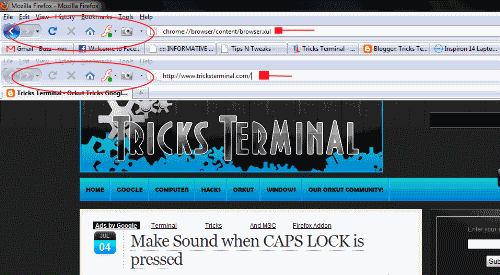
Have U tried opening Firefox...Inside firefox.....???
Well..try it out now...
just paste this code in address bar and hit Enter
chrome://browser/content/browser.xul

FeedBurner FeedCount