- Go to New Orkut!
- Type the text you want to send to all your friends/selected friends
- Click "change" (above the text box) and select the friends you want to send the scrap! ;)
- Click Post, and you are done! :)


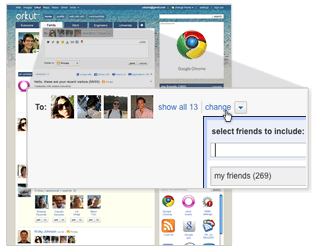

One of the latest Updates of orkut is "Private Scraps"
This is a much awaited update from orkut.
Very much useful! :)
How to Send a Private Scrap:
To send a private scrap on orkut, simply compose your message and, before posting it, click the drop-down menu named "visible to" and select the option 
Later on, if you see the label "
Official Announcement
We take privacy very seriously on orkut, and we want to make it really easy for everyone. That’s why we’re also launching private scraps, so you don’t have to use testimonials for private messages anymore. To keep something secret, just send a private scrap to your friends, and just those people selected will see it. Yep, just them! Recipients can also reply, creating a completely private conversation. Learn more about private scraps.
Privacy matters:
Every piece of content on orkut (a scrap, photo, video, etc) will be labeled with a privacy level, so you know who else is seeing it or not. Before sending a scrap or publishing an album you can select the privacy level you want for that specific content.
You can also edit or add more privacy to your overall experience visiting the new privacy settings window, designed to make your life much easier. You can open it at anytime by clicking the “settings” link on the top of any page. It will be faster than ever to select privacy levels the way you really want!

Do let us know what you think of this new feature by orkut!
| What's new |
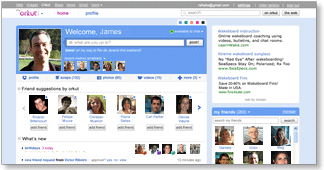
The orkut team has been working hard on building a new, fast and exciting experience. We've added lots of features and updated others - and we hope that existing and new users alike will enjoy this next generation of orkut. To start using the new orkut, check out the get started section. See you there!
Meantime, here's a look at the new orkut....
Faster & easier
 | Simpler and fasterOur team has worked closely with our pals at Google to create the fastest, easiest to use social network. It's all about speed: Now, you can browse photos, check out friend profiles, and view updates faster than ever. So you can enjoy your friends more, and spend less time waiting around for something to happen.
Our users told us they wanted to see their favorite activities at the top of the front page. The result: Larger photos, easier to access notifications, faster navigation, and more updates closer to the top... these are just some of changes we've made to speed things up. |
 | Easy navigation to other Google propertiesVisiting orkut but need to check your Gmail, or look up an address on Google Maps? Now its easy to stay logged in and visit any Google product by clicking on the small header at the top of any page.
|
 | One-stop notificationsNo more skipping around to collect your friend requests, testimonials, community requests or birthday announcements! Now you can review all your requests and announcements in one place. The 'what's new' section of the homepage shows all your notifications - just click an item to show more info or take action. Notifications stay on that page until you take action, and you can see earlier notifications by clicking "older". |
 | Fast photo uploads and photo sharingNow you can select multiple photos and upload them 3x faster. And there's no more waiting as photos upload, so you can start reordering your images right away. Just drag and drop them as you want, rotate them, pick an album cover, or add captions. You can also share the album with groups of friends with a single click, or by selecting faces to tag with your photos. Your friends don't need to be on orkut to see your photos, either - just enter their emails and they can see the images without signing up. Not sure who to share with? Orkut will suggest other folks who might want to see your photos. Photo sharing is a total snap with the new orkut. |

Make it your own
 | State your status!"Ready for the weekend!!!" "Going to the game :)" "Touched down in New York ;)" - Tell your friends what you're up to by changing the status on your homepage. Your status is always visible to friends on your profile page, and gets posted to friends' updates immediately. With the new orkut, your pals can also comment on your status in the 'friends updates' section. Check and change your status whenever you want, and keep everyone in the loop. |
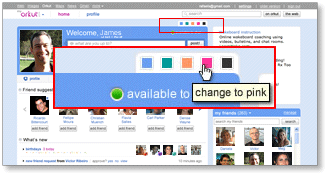
 | Pick your favorite colorsWe've made orkut even more colorful by letting you customize your profile and homepage with your choice of 5 colors. Just pick a new color, and when your friends visit your profile, your page will have a whole new hue.
|
 | It's all 'about me' with more customizationIf you want to do more than just write about yourself, now you can add a YouTube video, a photo or even embed apps in the 'about me' section. Go to your profile and click on 'about me' to add, edit, and make it truly your own. |
Friendlier friending
 | Find and invite friends - fast!Finding friends is one of the most important activities on orkut! That's why we've made our "find friends" feature smarter and easier to use. When orkut finds someone you may know, you'll see a suggestion to connect right on your homepage. And if there's a close friend who's not on orkut yet, we'll help you get them on orkut fast, too. Just select "add as friend" (or "invite" for non-orkut users) and send a quick message to invite them to join you on orkut. Once they accept your invitation, they'll be added to your friends list so you can start sharing your world through orkut. |
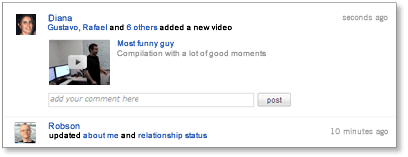
 | Cool new friends' updates on your homepageTired of just reading updates from friends? Now with inline comments for status messages, photos and videos, plus easy to use inline video play, your friends' updates make it easy to interact with your friends, not just read their static postings.
Start typing anywhere you see a comment box, then click "post" and your comment will be added to your friend's latest update. Any photo comment you leave in updates will also show up on the actual photo page.
Want to watch a video right away? Great! Just click on the video and it will expand and play directly in the updates section. Love the video so much you want to add it to your favorites? Select the option to add to your favorites and it will show up in your own 'videos' section. |
 | More dynamic friends listWant to find a friend quickly? Your 'my friends' section now lets you scroll through all of your friends directly from homepage. Or just start typing a friend's name in the friends search box, and you'll see only those friends with names that match what you typed. Also, if you have your friends organized in different groups, you can use the pull-down menu next to 'my friends' to filter for different groups of friends. |
 | Latest activity updates on friends profilesUpdated streams on your friends profile pages tell you what they've been doing lately - including photo and video uploads, apps activities, new friends added and more. It's the next best thing to being there in person! |

Connect in new ways
 | Post a scrap to say "hello"Want to say a quick "what's up" to a friend? The 'scrap' feature lets you post directly to their profile pages. It's never been easier to drop by and leave a message. |
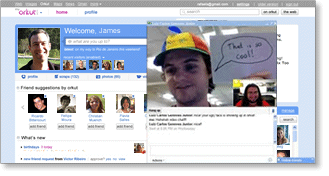
 | Video chatFace-to-face just got a lot easier, thanks to orkut's new video chat feature. Simply start a chat with a friend the old-fashioned way, then click "actions" on the chat window. You can choose between audio, video or group chat.
|
 | Promote stuff through your friends'Orkut Promote' is a cool new feature that lets you create online flyers you can share with your friends. Want to sell your old skateboard? Spreading the word about a new video? Just create a promotion and have your friends to forward your items onto their friends. Promote encourages content sharing from friend to friend, and group to group. You can even track how many people have seen your promotions by visiting the metrics tab. |


Another new Update by orkut..
The Promote Option !
With this option u can promote ur Videos , Communities , texts photos and more !
How to use?
Check below ur display picture and bottom of the list.. (right side)
ie; down of Profile --> Scrapbook --> Photos --> videos --> testimonials --> events --> promote
or Go here ?
http://www.orkut.co.in/Main#Promote
Click Create a promotion and start promoting =)
and all these promotions will be appearing in the right side of the person's profile !!
Benefits & uses of it !
» Orkut Promote lets you and your friends share YouTube videos, photos, or text with each other, so you can easily spread word of a funny video, a cool picture, or an upcoming event.
» You can reshare your friends promotions, and they can reshare yours, so the information can spread throughout orkut.
» Once you've promoted something, you can track how many people have seen your promotion, and how many of them have shared it with their friends or trashed it under the my promotions tab.
Now, Promote Option is also Available In Community Home Pages too !! =)
So Enjoy!!
Please Comment if u like my post ;)

Orkut has introduced another new theme which is named as I, Music Jockey!
Its by Xpress Music of Nokia!
How to use?
- Go to Edit Profile!
- Click Themes
- Click I,Music Jokey
- And Apply!
- Directly go here!
- http://www.orkut.co.in/Main#EditSkin?sid=55
- And Done :)

orkut is all about bringing real friends together no matter where they may be. Now that we've made it possible for all you can chat your friends inside orkut, we figured it was time to make the chat experience even richer. That's why we're so pleased to announce the launch of orkut video chat– a great new way for you and your friends to keep in touch face-to-face directly from your orkut homepage.
Have a webcam connected to your computer? Just take a few seconds to download a small plugin, install it, and you'll be all set to go.

Video chat makes it easy to keep in touch with everyone you know by letting you chat with friends signed in via Gmail and iGoogle, even if they're not orkut users. Orkut hopes that this new feature helps you stay connected to the people you care about and makes orkut an even more fun place to hang out. If you've got feedback about video chat you'd like to share, Please Post it in orkut help forum and let them know!

FeedBurner FeedCount